A product landing page —
in a minute from a product link
Paste a product link from Amazon, AliExpress, eBay, Shopify or any online store — get a landing page with copy, photos and an order form. Then: 12 templates and 90 block variants, your own domain with SSL, leads in Telegram and your CRM, analytics down to sub1.
- ✓Try it without signing up
- ✓Leads in Telegram within seconds
- ✓Pro free for 7 days, no card
- types of blocks, including timer, stock counter, and bundle selector
- 34
- ready-made landing pages for single-product niches
- 12
- design themes: fonts, colors, button styles
- 10
- for an HTTPS certificate on your domain — forever
- $0
What's new this week
The service updates weekly. Here's what's already working on your landing pages — no extra fees or reconfiguration needed: open the editor and new blocks are already in the palette.
- NewPro
Virtual try-on
The customer uploads their photo — and in about 20 seconds sees themselves in that jacket or dress. The "Order" button automatically fills in the selected color in the form.
- New
"Size L for me" — size finder
Height and weight sliders — and your size chart appears as a capital letter. "I'll take L" fills in the size in the lead, so your operator doesn't have to ask again.
- New
Stories mode
The page scrolls screen by screen like Instagram stories: tap — next, last screen — order form. Turn it on with one checkbox in design settings.
- New
Discount wheel
Customer spins the wheel and wins a discount or gift — the prize comes with the lead. A separate template with the game on the first screen.
- New
Google Sheets
Each lead appears as a new row in your Google Sheet, tagged with its source. No Zapier or developer needed.
- New
Incomplete leads
Customer entered their phone but didn't click "Order" — you still get the number. Plus a popup offer when they're about to leave.
- NewPro
AI page analysis
AI page review
- NewPro
The neural network looks at your landing page and its stats and tells you what to fix first: headline, price, form, or block order.
Approval rate and pickup from CRM
From a blank screen to your first lead — forty minutes
Not "quick and easy," but minutes broken down step by step. Three-quarters of the time goes to your product — copy, photos, and price. The rest is technical, and almost all of it's automatic.
- 011 min
Sign Up
Email and password. No card needed — not now, not for the trial Pro plan.
- 023 min
Template or AI
Pick one of 12 ready-made landing pages or describe your product — and AI builds the page for you.
- 0330 min
Your product
Headline, photos, price, reviews, form fields. This is the only part that needs you.
- 041 min
Publish
Hit "Publish." Until then, all changes stay in draft and don't go live.
- 055 min
Domain and pixel
A-record at your registrar, Meta Pixel in a field. HTTPS certificate issues automatically.
Total — 40 minutes from a blank screen to a page on your own domain, with the technical setup taking just 10 minutes. The traditional path here involves a technical brief for a designer, layout, a programmer, hosting, and a separate certificate: a week and significant money spent before even the first click.
Already have a landing page? Bring it here via link
Exact copy — same layout, photos, and fonts, but now on your domain with leads going to your dashboard. And it's not a "museum piece": the migrated page edits with the regular editor — text, photos, buttons, sections.
Link to your live page
Exact replica: layout, photos, fonts. Files move to our storage, third-party scripts and builder watermarks are removed, form submissions come to you.
No downloads or forms to fill. One field — then wait a minute.
Along with images, styles, and fonts. The form is rebuilt for our lead system, legal pages in the footer become yours.
The copy opens in the regular editor: sections on the left, page in the middle, properties on the right. Draft and publish are separate.
Click the text — edit it right on the page.
On LP-Mobi pages, almost all photos are background styles. They change the same way regular images do.
Text, link, "go to order form," "call us."
Rearrange, copy, hide, or delete entirely.
Hint, label in the lead, required field.
Until end of day or set hours — loops continuously.
Design themes, block palette, and A/B testing work with our blocks. If you need them — the copy builds with one click using blocks, and an exact copy is preserved.
Blocks you won't find in "universal" builders
No need to assemble a timer from squares or manually type "12 left in stock." These are separate blocks: add one, enter the number, and it works.
Sale timer
Evergreen: hits zero and restarts. You set hours and minutes, it handles the rest.
Old price and discount
Two columns: strikethrough price and new price. Savings percentage calculates automatically from both numbers.
Stock remaining
"12 left at sale price." You set the number — and see it exactly where your customer does.
Bundle selection
1 pc / 2 pcs / bundle with gift. Customer taps what they want — the choice goes straight into the lead.
Before / After
Swipe slider. For cosmetics, household products, anything where results are visible.
What's in the box
Photo of each item with a label: customer sees exactly what they're paying for and won't ask on the call.
Customer reviews
Name, city, photo, and stars. List or carousel — toggle with one field in the inspector.
Us vs. Others
Table with checkmarks and X's. Answers "why are you better than cheaper competitors."
Shipping and payment
Shipping provider, courier, pickup, cash on delivery — delivery time and price on each line.
Quiz before lead
Three questions instead of a bare form. Answers come with the lead — your operator already knows everything.
"Just ordered"
Live feed of fresh orders: name, city, minutes ago. Real movement at the bottom of the screen.
Lead form
Name and phone with format validation plus up to 8 custom fields: city, address, size, color.
Sticky button
Doesn't disappear on scroll: timer on the left, "Order" on the right. Button always under your thumb.
FAQ accordion
Questions expand on click. Removes objections before the customer even thinks them.
Discount wheelNew
Name and phone with format validation plus up to [#1] custom fields: city, address, size, color.
"Size L for me" — size finderNew
Customer spins the wheel and wins a discount or gift. The prize is recorded in the lead — your operator knows what was promised.
Virtual try-onNew
Customer uploads their photo and sees themselves in the item in their chosen color. On the Pro plan, no lingerie or swimwear.
Customer conversationsNew
Telegram, Viber, and direct message chats designed as iPhone screenshots: names, avatars, messages, photos, and read receipts — all fully customizable.
Social media-style profileNew
Story-style colored avatar, stats, bio, and activity rings: tap to view photos fullscreen like a story, with an "Order" button.
Post with likesNew
Photos swipe horizontally, double-tap adds a like with a large heart, order bar and comments below the photo.
Plus headlines, text, photos, gallery, video, specs, order steps, guarantees, benefits, photo instructions, and testimonials — all together 34 block types. All drag-and-drop, copy, and undo with Ctrl+Z.
Your domain, your certificate, no trace of the platform
Customer sees your store in the address bar, not someone else's builder. Meta moderation sees it too.
- 1
You buy a domain
With any registrar, $3–$10 per year. The domain is yours, not ours, and will remain yours if you leave.
- 2
Set an A record
One line in your registrar's panel: an A record pointing to the platform's IP. You'll find the address in your landing page settings.
- 3
Enter the domain in your dashboard
Go to the "Domain" tab in your landing page. The record check happens instantly — no manual waiting required.
- 4
Open it — and HTTPS is already there
The certificate is issued on first visit and auto-renews. No separate SSL payment needed.
- Start
- 1
- domain
- Pro
- 10
- domains
- Business
- 50
- domains
See which bundle pays for itself — down to the sub1 level
Visits, unique visitors, leads, and conversion by day. Plus a breakdown by "source × campaign × sub1" and an A/B test that tells you when differences matter.
Source × campaign × sub1
URL tags unpack automatically. You don't just see "6,777 visits came in" — you see which exact creative brought the lead and how many clicks it took.
| Source | Campaign | sub1 | Visits | Leads | CR |
|---|---|---|---|---|---|
| neck_eu_01 | creative_07 | 1 842 | 96 | 5,2 % | |
| tiktok | tt_neck_02 | video_a | 3 105 | 141 | 4,5 % |
| neck_eu_01 | creative_03 | 1 210 | 31 | 2,6 % | |
| search_brand | — | 620 | 18 | 2,9 % |
Here's what matters: creative_07 and creative_03 run in the same campaign, but conversion differs by half. One gets turned off, the other scales — today, not after you export to Excel at week's end.
Numbers in the table are sample report data, not our actual stats.
A/B test with significance check
Traffic splits between page versions by visitor hash: one person always sees one version. Then the service decides if the difference is real.
This gap between two identical versions would happen less than 5 times out of 100. While leads are few, the service says "too early" and counts how many more visits to collect. There's no room for a confidence percentage pulled out of thin air — you'd be stopping live traffic on it.
Visits and leads are sample data; the confidence percentage was calculated with the same function that runs in your dashboard.
Every lead in Telegram — the same second
The form checks the phone number and filters spam. Then each lead goes where someone acts on it: your dashboard, Telegram, your CRM or your affiliate network.
- Name:
- Emma
- Phone:
- +1 415 555 0132
- Address:
- Austin, TX 78701
- Bundle:
- 2 pcs, discounted
- Tags:
- facebook · neck_us_01 · creative_07
- Page:
- neckrelief.shop
Dashboard: a mini CRM
Statuses new / accepted / spam, search by phone, filters by page and date, CSV export. No lead gets lost, even if someone else on your team opens Telegram first.
Telegram and email
To your own bot and inbox — the very second the buyer taps the button. The phone number is validated right in the form, so your list stays free of junk numbers.
Affiliate network and CRM
GET postback with
{clickid},{sub1}…{status}macros and a JSON webhook signed with HMAC-SHA256 — the receiver can verify the lead really came from you. Built-in integrations: HubSpot, Pipedrive, Salesforce, Bitrix24, Kommo (amoCRM), Close, Google Sheets.
12 ready-made landing pages — open any one
Hover over the phone — the page scrolls to the bottom. "View full" shows the live version with timer and form. Each is built with its own design theme, so your landing page won't look like everyone else's.
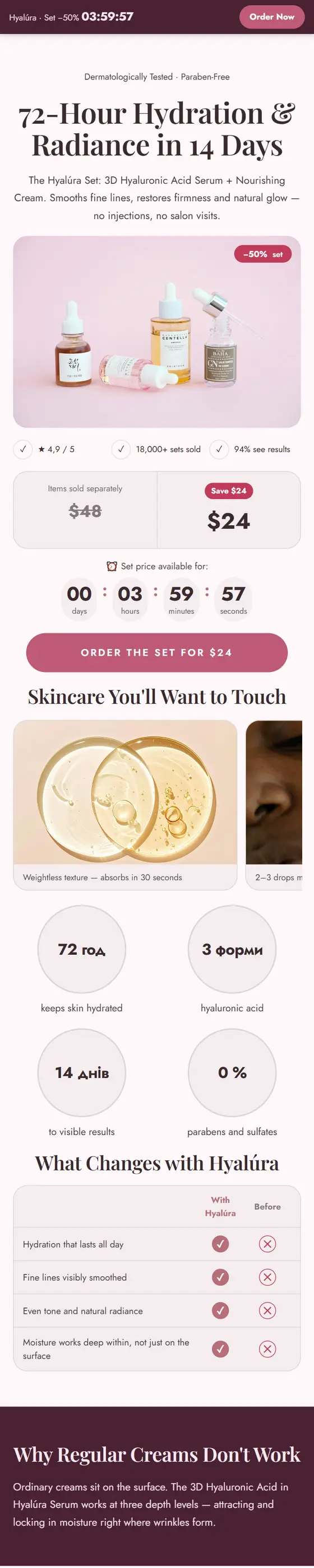
Single-product landing page
Health & beauty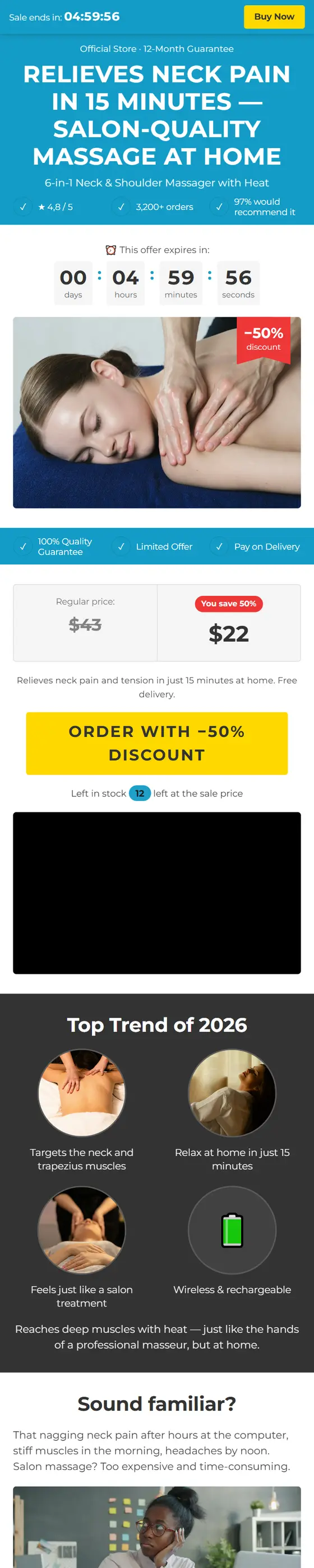
Instagram Profile (like social media)
Clothing & accessories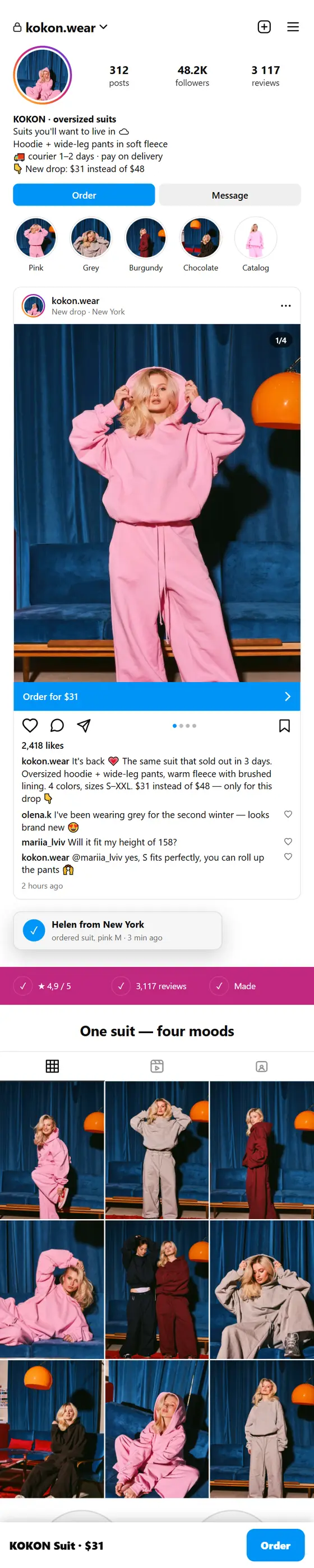
Discount wheel (game on first screen)
Electronics & gadgets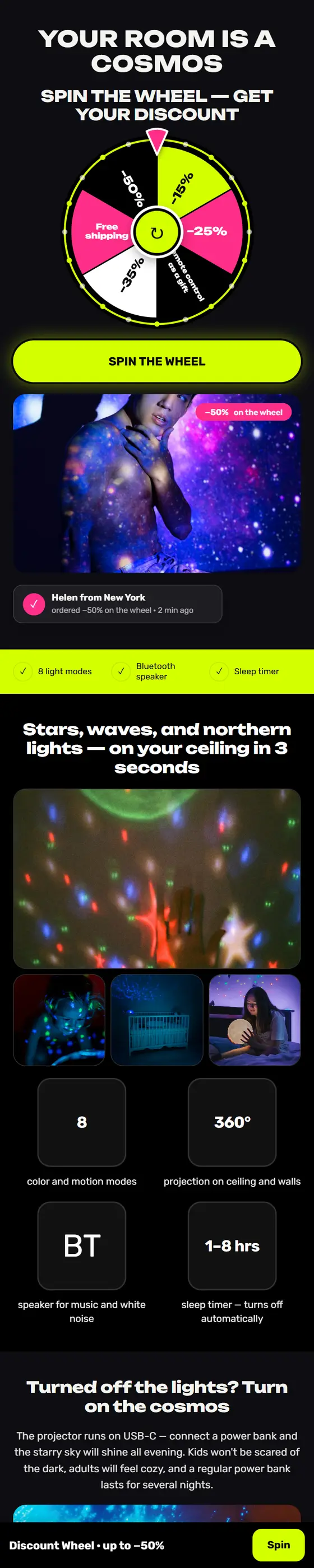
Tap-to-order button (checkout in modal)
Home & kitchen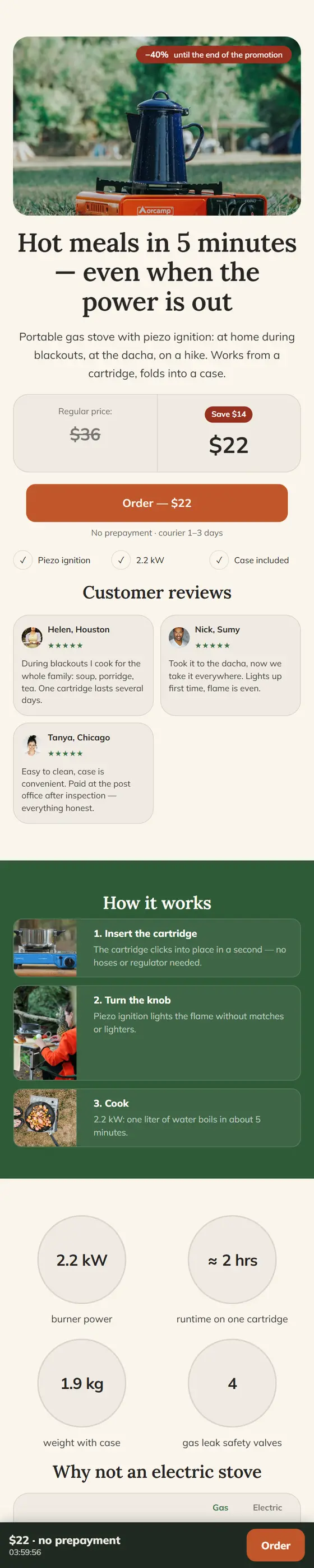
Gadget (dark premium)
Electronics & gadgets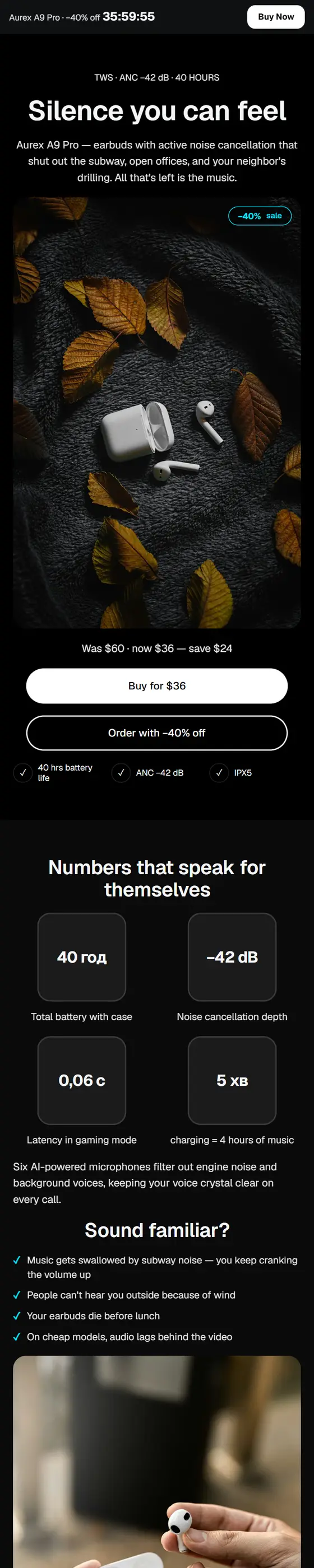
Cosmetics (beauty, soft luxury)
Health & beautySports gear (energy)
Sports & fitness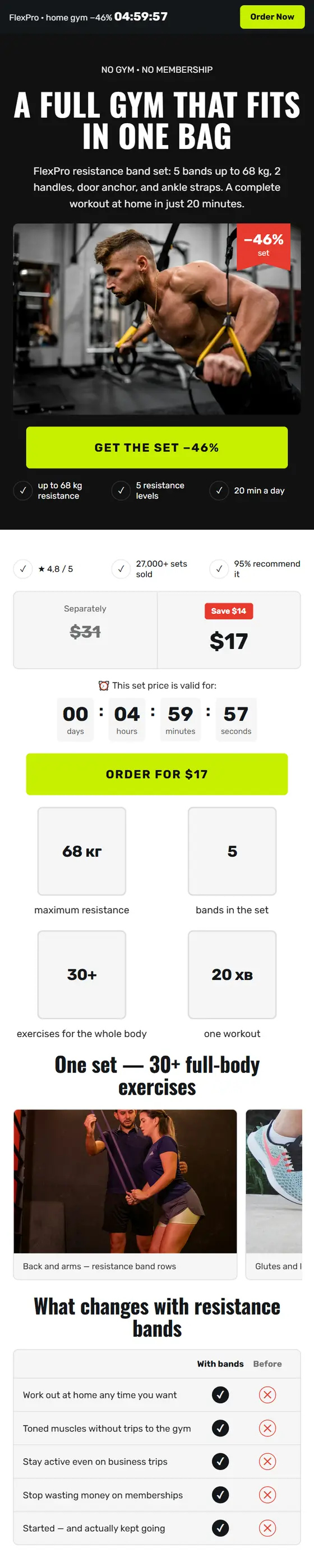
Home goods (eco, warm)
Home & kitchen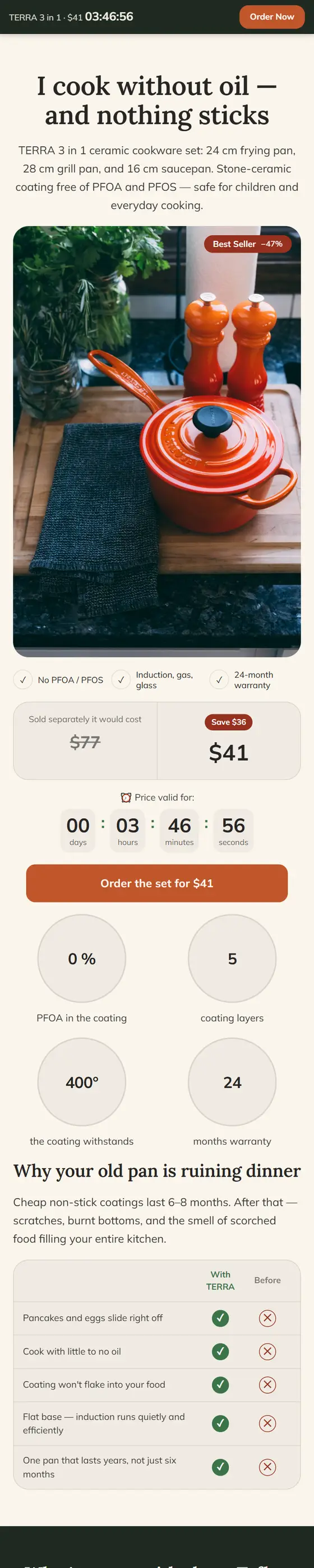
Kids' products (bright)
Kids' products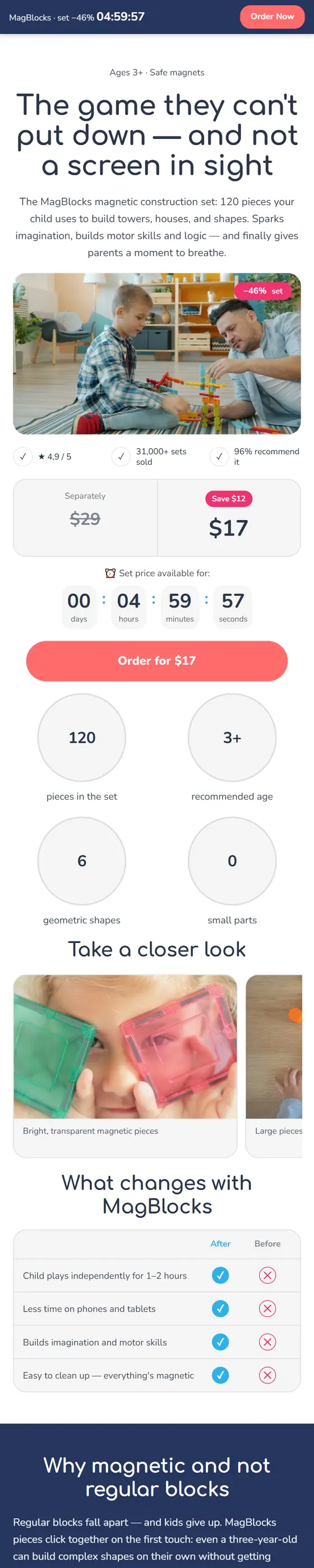
Garage — air compressor
Auto parts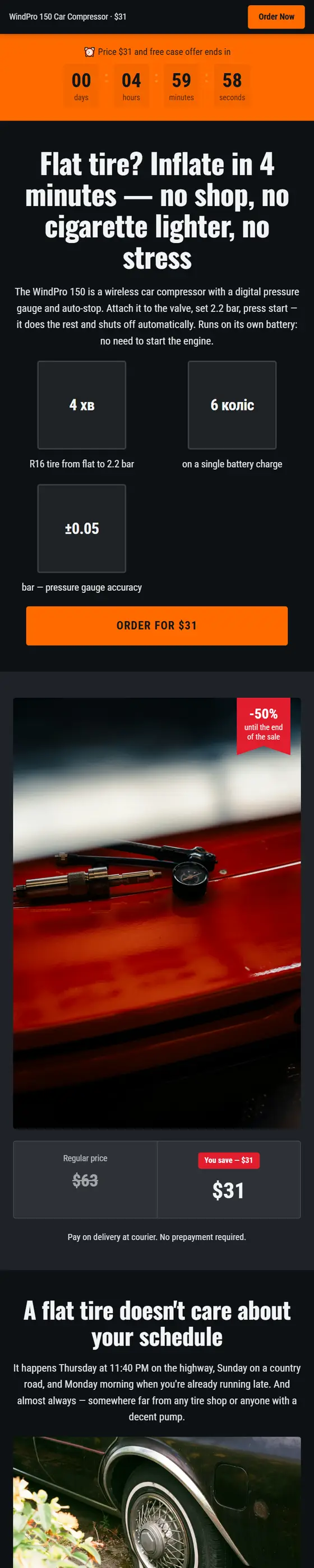
Petto — self-cleaning slicker brush
Pet supplies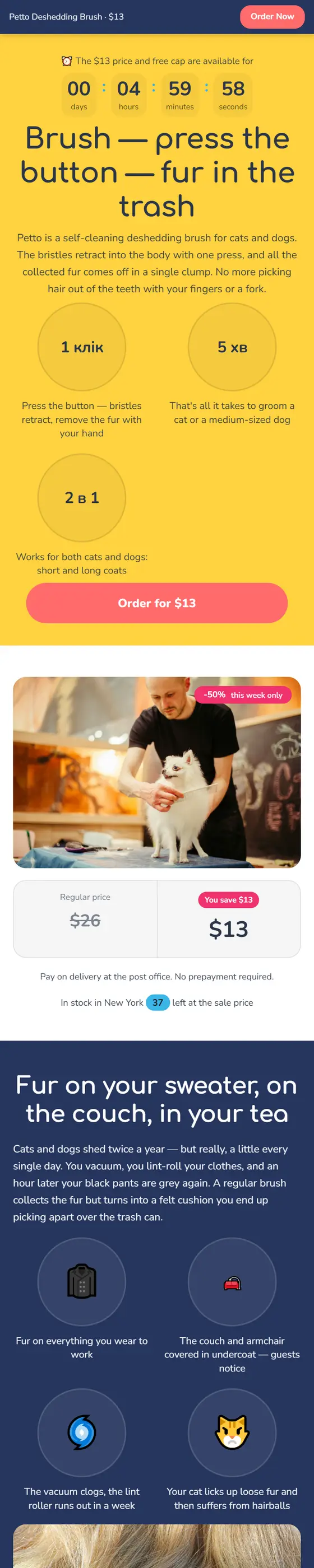
Orthopedic insoles (mint)
Health & comfort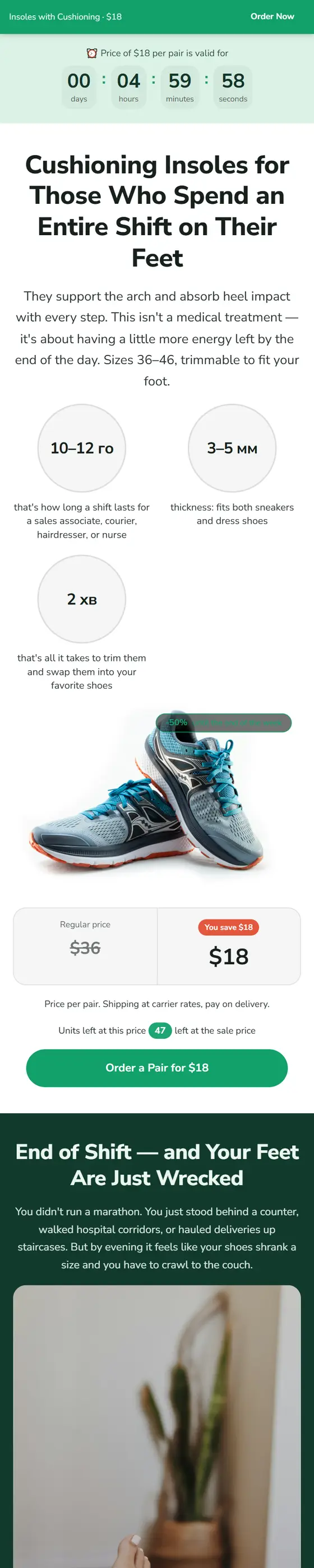
Start free, pay when leads come in
Prices are in USD; if your card is in another currency, your bank will convert the amount at their rate: monthly plan — 30 days of access, yearly plan — 365 days plus two months free. You can cancel your subscription anytime or change your plan.
New accounts: 25% off the first month of any plan, plus 7 days of Pro free.
Pro for 7 days free
No card required, no auto-renewals: just click a button in your dashboard. Full Pro, not a limited trial — with your own domain, unlimited leads, try-on mockups, and AI page analysis.
Year = 10 months
Pay for 365 days and get the equivalent of ten months: two months free. Your subscription renews automatically from the same card—cancel anytime in your dashboard.
Free
Build a landing page, see it live, and get your first leads — no card required.
- 1 landing page
- All blocks, themes & templates
- Leads to your dashboard and Telegram — 3 per month
- "Made on LandEmpire" branding
Start
Test one product on your own domain with a pixel — nothing extra.
- 2 landing pages
- 1 custom domain with HTTPS
- 100 leads per month
- Facebook / TikTok / Google pixels
- 1 team member
- "Made on LandEmpire" branding
Pro
For those running traffic daily: unlimited leads, postback, CRM, A/B tests, team.
- 10 landing pages
- 10 custom domains
- Unlimited leads
- Pixels, postback to tracker and CPA network
- Analytics: sources × sub1, behavior
- A/B test: up to 4 versions
- CRM: HubSpot, Pipedrive, Salesforce, Bitrix24 and 2 more
- Zapier / Make / custom CRM webhook
- Export leads to CSV, download HTML
- AI page analysis in analytics
- Try on with customer's photo
- Share landing page with client
- 3 team members
Business
For those who live by ads: server-side leads to Facebook, unlimited landing pages, team access.
- Everything from Pro
- Facebook Conversions API: server-side leads bypass blockers
- No LandEmpire branding
- Unlimited landing pages
- 50 custom domains
- 10 team members
- A/B test: up to 6 versions
- Priority support
| Feature | Free | Start | Pro | Business |
|---|---|---|---|---|
| Landing pages | 1 | 2 | 10 | ∞ |
| Leads per monthExcess leads are saved and unlocked on higher plans | 3 | 100 | ∞ | ∞ |
| Custom domainsFree HTTPS certificate | — | 1 | 10 | 50 |
| Team membersseparate login, individual permissions | — | 1 | 3 | 10 |
| A/B test versionsincluding the main page version | — | — | 4 | 6 |
| "Made on LandEmpire" branding | included | included | included | — |
| Facebook / TikTok / Google pixels | — | included | included | included |
| Postback to tracker and CPA network{clickid} {sub1} {status} | — | — | included | included |
| Analytics: sources × sub1, funnel, behavior | — | — | included | included |
| Export leads to CSV | — | — | included | included |
| Download landing page as HTML fileto your hosting, leads go to your dashboard | — | — | included | included |
| CRM: HubSpot, Pipedrive, Salesforce, Bitrix24 and 2 more | — | — | included | included |
| Zapier / Make / custom CRM webhook | — | — | included | included |
| AI page analysis in analytics | — | — | included | included |
| Try on with customer's photo | — | — | included | included |
| Transfer landing page to another user | — | — | included | included |
| Facebook Conversions API — server-side leads | — | — | — | included |
| Priority support | — | — | — | included |
Paid plans – Start, Pro, and Business: the cost is in US dollars for 30 days of access or 365 days; if your card is in another currency, the bank will convert the amount at its own exchange rate. The Free plan is free access: it is not sold or paid for.
Payment via Paddle: Visa, Mastercard, Apple Pay, Google Pay, PayPal. If your card is in another currency, your bank will convert the amount at their rate. Your card data never reaches our servers.
Not a fit — we refund the full amount within 14 days of your first payment. Terms, offer, and service provider details:
FAQ
Do I need to know how to code?+
No. The landing page is built with your mouse from ready-made blocks, and you can start with a template that already has text and blocks laid out — just swap in your product, photos, and price.
Can I work for free?+
Yes. The Free plan includes one landing page with all blocks and themes, and accepts up to 3 leads per month in your dashboard and Telegram — with a small "Built with LandEmpire" credit at the bottom of the page. No credit card required. Custom domain and pixels are available starting with the Start plan ($8); unlimited leads, postback, source analytics, CRM, and webhooks come with Pro.
How do I add a custom domain?+
Buy a domain from any registrar, add an A record pointing to the platform IP (shown in your landing page settings), and enter the domain in the "Domain" tab. An HTTPS certificate will be issued automatically on first access — no SSL payment needed.
Where do leads go?+
In your dashboard (with statuses "new / in progress / approved / spam" and CSV export), in your Telegram bot, and via email. For CPA networks, there's a postback with macros and a webhook with HMAC signature — leads go to your CRM automatically. Incomplete leads — phone number entered but "Order" not clicked — are also saved in the dashboard, and approval rate and pickup statuses are pulled from Pipedrive and HubSpot.
How do I pay for a subscription?+
In your dashboard, under "Plan": select a plan and billing period, then pay in Paddle's secure window — our payment partner: Visa, Mastercard, American Express, Apple Pay, Google Pay, or PayPal. Prices are in USD; if your card is in another currency, your bank will convert the amount at their rate. Your card data never reaches our servers; Paddle emails you a receipt and invoice. Access opens automatically within a minute. Your subscription renews automatically; you can cancel anytime in the "Plan" section.
Can I get a refund?+
Yes. Within 14 calendar days of your first payment, we refund the full amount if the service isn't right for you. Send a request from your account email; we review it within three business days and refund to the same card; your bank processes it within 30 banking days. Full terms are in the "Refunds" document.
What happens to my landing pages if I stop paying?+
Your subscription simply reverts to Free: your landing pages and leads stay in your dashboard, but extra pages, custom domains, pixels, postbacks, and CRM turn off. Data isn't deleted — after you pay again, everything turns back on with no reconfiguration needed.
You can launch your next offer today
Sign up in a minute — no card needed. Grab a template, add your product, and turn on traffic. Didn't work out — you lost nothing.